Tropical rainfall diagnostic
The precipitation variability is an excellent indicator of the accuracy of climatological simulations. The goal of tropical rainfall diagnostic is to provide fast and straightforward precipitation analysis in tropical or global areas.
Description
The current version of tropical rainfall diagnostic successfully achieves the minimal requirements:
calculation of histograms for selected tropical area band,
calculation of the seasonal mean of precipitation along the latitude or longitude coordinate,
calculation of the bias between the climatological model and observations, and
diurnal, i.e., daily variability of precipitation data.
The diagnostic also provides us with simple in-the-use plotting functions to create a graphical representation of obtained results.
Structure
The Tropical-Rainfall Diagnostic is structured around a main class and associated utility classes, organized across several files to facilitate ease of use and modularity:
- Core Files:
tropical_rainfall_class.py: Contains the Tropical_Rainfall class, which includes the constructor and method definitions essential for the diagnostic operations.
pyproject.toml: Configuration file used to install the diagnostic package.
- Documentation and Examples:
README.md: Provides technical installation guidelines and general information about the tropical-rainfall diagnostic.
notebooks/*.ipynb: A collection of iPython notebooks demonstrating the use of the tropical rainfall class and its methods.
- Configuration:
config-tropical-rainfall.yml`: A YAML file specifying necessary settings for the physical quantities required for proper diagnostic initialization.
- Command Line Interface (CLI):
cli_tropical_rainfall.py: Python script that initializes the Tropical_Rainfall_CLI class and contains the actual list of functions to run.
src/tropical_rainfall_cli_class.py and src/tropical_rainfall_utils.py: These files include the CLI class and utility functions that are necessary to utilize the CLI efficiently.
cli_config_trop_rainfall.yml: A YAML file specifying settings necessary for the CLI execution and physical quantities required for proper diagnostic initialization.
run_cli_tropical_rainfall.sh: A Bash script that submits the CLI script to the Slurm queue.
Detailed Class Descriptions:
- src/tropical_rainfall_main:
Purpose: Serves as the main functional class for the diagnostic, encapsulating key functionalities such as histogram generation and plotting.
Methods: Includes histogram, histogram_plot, get_95percent_level, etc.
Attributes: Handles major physical quantities such as tropical latitude band (trop_lat), number of histogram bins (num_of_bins), bin width (width_of_bin), model variables, etc.
- src/tropical_rainfall_plots:
Purpose: Manages all plotting functions specific to the diagnostics.
Methods: Features methods like histogram_plot, plot_of_average, daily_variability_plot, etc.
Attributes: Plotting-specific settings such as PDF format (pdf_format), figure size (figsize), font size (fontsize), line style (linestyle), line width (linewidth), and others. Incorporating these directly into the class allows for uniform styling across plots through initial class setup rather than manual specification for each function.
- src/tropical_rainfall_tools:
Purpose: Contains utility functions that support the diagnostic processes but are not directly involved in scientific calculations or plotting.
Methods: Includes open_dataset, find_files_with_keys, remove_file_if_exists_with_keys, check_need_for_regridding, etc.
Attributes: None
- src/tropical_rainfall_meta:
Purpose: Facilitates the importation of methods from nested classes into the main class file for streamlined access and use.
Functionality: Allows specific or all methods from nested classes to be treated as methods of the main tropical_rainfall_class.py, simplifying the structure and enhancing the compactness of the diagnostic by segmenting the class into smaller, more manageable units.
Attributes: None
This structure and documentation aim to provide clear guidance on the functionality and organization of the Tropical-Rainfall Diagnostic package, making it accessible and easy to use for its intended purposes.
Input variables
mtpr (total precipitation rate, GRIB paramid 235055)
Output
All output of the diagnostic is in the format of NetCDF to be further analysed, or in PDF for rapid visualization.
Examples
The histogram calculation
The most straightforward illustration of a histogram calculation with continuous uniform binning:
diag = Tropical_Rainfall(num_of_bins=20, first_edge=0, width_of_bin=0.5)
diag.histogram(ifs)
The default unit of precipitation is set to mm/day. Users can set a new unit either by assigning a new value to the class attribute as shown below
diag.new_units = 'mm/hr'
Alternatively, users can pass the new_units argument directly to the histogram function.
The output from the histogram function is an xarray.Dataset, which includes two coordinates:
center_of_bin: the center of each bin
width: width of each bin
The xarray.Dataset contains three variables:
counts: the raw number of cases in each bin
frequency: the proportion of cases in each bin, normalized by the total number of cases
pdf: the probability distribution function
pdfP: the probability distribution function multiplied by probability.
The resulting xarray.Dataset features both local and global attributes. The global attribute history and local attributes provide details about the temporal and spatial grid used for the diagnostic calculations: time_band, lat_band, and lon_band.
For more detailed information about these attributes, refer to the notebook located at $AQUA/diagnostics/tropical_rainfall/notebooks/functions_demo/data_attributes.ipynb.
List of histograms
The diagnostic can combine any number of histograms into a single histogram, recalculating the frequencies and PDF values while automatically modifying the attributes.
For example, to merge all histograms from a specified repository, use the following code:
path_to_histograms = "/path/to/histograms/"
merged_histograms = diag.merge_list_of_histograms(path_to_histograms=path_to_histograms)
It is advisable to store the obtained histograms for distinct models in separate repositories to avoid potential errors. Alternatively, you can specify a keyword as a flag:
merged_histograms = diag.merge_list_of_histograms(path_to_histograms=path_to_histograms, flag='model_exp')
If you wish to merge only a specific subset of histograms, set the start_year, end_year, start_month, and end_month arguments in the function. The function will then sort the files in the repository and merge the histograms that meet the specified time range.
The histogram plots
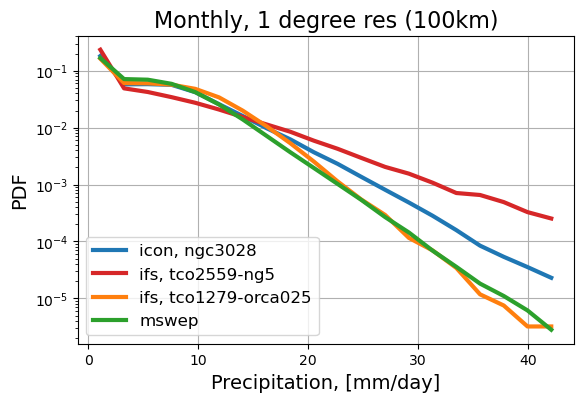
The diagnostic contains the simple in-the-use function to create the histogram plot. The user can create plots of the obtained data in different styles and scales. The example of a histogram plot is:
diag.histogram_plot(histogram, smooth=True, figsize=0.7,
                    xlogscale=True, ylogscale=True)
You can find an example of the histogram obtained with the tropical-rainfall diagnostic below.
Seasonal Mean Values
The diagnostic can provide us with a graphical comparison of the mean value along different coordinates. For example, the function
diag.trop_lat = 90
diag.mean_and_median_plot(icon_historical_1990, coord='lon',
                          legend='icon, historical-1990', new_unit='mm/hr')
calculates the mean value of precipitation along the longitude during
December-January-February (DJF),
March-April-May (MAM),
June-July-August (JJA),
September-October-November (SON), and
for the total period of time.
Bias between model and observations
Tropical-rainfall diagnostic provides the graphical representation of the bias between the mean value of precipitation of the climatological model and the mean value of observations. The function
diag.plot_bias(icon_historical_1990, dataset_2=mswep, seasons=True, new_unit='mm/day',
               trop_lat=90, vmin=-10, vmax=10,
               plot_title='The bias between icon, historical-1990 and mswep, monthly, 1 degree res (100km)',
               path_to_pdf=path_to_pdf, name_of_file='icon_historical_1990_mswep_lra_r100_monthly_bias')
calculates the mean value of precipitation for each season DJF, MAM, JJA, SON and for the total period of time.
Available demo notebooks
The notebooks/ folder contains several notebooks demonstrating various functionalities:
Diagnostic Demonstartion on Low_resolution data:
Histogram comparison for different climate models
Merging separate plots into a single one
Mean tropical and global precipitation calculations for different climate models
Bias between climatological model and observations
-
Initialization of a diagnostic class object
Selection of class attributes
Calculation of histograms in the form of xarray
Saving histograms in storage
Loading histograms from storage
-
Selection of plot styles and color maps
Adjusting plot size and axes scales
Saving plots into storage
Plotting counts, frequencies, and probability density functions from histograms
-
Saving histograms per data chunk during streaming
Loading and merging multiple histograms into a single histogram
Data attributes of produced output:
Saving high-resolution data chunks with unique filenames including time_band
Automatically updating time_band when merging datasets
Ensuring merged datasets reflect the accurate total time band
Detailed API
This section provides a detailed reference for the Application Programming Interface (API) of the “tropical_rainfall” diagnostic, produced from the diagnostic function docstrings.