Sea Ice Diagnostic
Description
The SeaIce diagnostic is a set of tools for the analysis and visualization of sea ice metrics from climate model outputs. It supports analysis of sea ice extent, volume, fraction, and thickness.
SeaIce provides tools to plot:
Time series of sea ice extent and volume
Seasonal cycles with optional uncertainty bands
2D climatology maps of sea ice fraction and thickness
Bias maps between models and reference datasets
Time series and seasonal cycles can be computed over a specific region of the Northern or Southern Hemisphere. Default regions are the Arctic and the Antarctic regions, but it is possible to select other regions and custom regions can be defined in the configuration file.
Two main components are included:
A class that performs the computations and prepares the data (including saving NetCDF files).
Separate classes for producing 1D (time series) and 2D (maps) visualizations.
Classes
There is one class for the analysis and two for the plotting:
SeaIce: performs all core computations for sea ice metrics —
extent,volume,fraction, andthicknessmetrics — for a single model or reference dataset. It manages data loading, regional masking, spatial integration, and statistical processing. It supports time series analysis and seasonal cycle computation with optional standard deviation calculations.Time-series methods (compute integrated values over user-defined regions):
extent: computes the area of ocean grid cells with a configurable sea-ice concentrationthreshold(default: 15%).volume: computes the integrated sea-ice thickness across each region.
2D spatial methods (compute monthly climatological maps):
fraction: returns monthly mean maps of sea-ice concentration (0-1).thickness: returns monthly mean maps of sea-ice thickness (in meters).
PlotSeaIce: generates time-series and seasonal-cycle visualizations. It can receive a
xarray.DataArray, axarray.Dataset, or a list ofxarray.Datasetobjects containing sea-ice diagnostics from multiple models and a reference dataset, enabling direct comparisons.Plot2DSeaIce: produces visualizations for 2D spatial climatologies and corresponding biases across all months. It supports the same data formats as PlotSeaIce, allowing side-by-side evaluation of multiple models against observations or a chosen reference.
Note
The extent and volume methods produce time series data, while fraction and thickness methods produce 2D spatial maps.
File structure
The diagnostic is located in the
aqua/diagnostics/seaicedirectory, which contains both the source code and the command line interface (CLI) script.A template configuration file is available at
aqua/diagnostics/templates/diagnostics/config-seaice.yamlRegional definitions are available in
aqua/diagnostics/config/definitions/regions.yaml.Notebooks are available in the
notebooks/diagnostics/seaicedirectory and contain examples of how to use the diagnostic.
Input variables and datasets
The diagnostic supports the following variables (the Fixer class of AQUA-core can convert different variable names into the accepted format):
siconc(sea ice concentration, GRIB parameter id 31)sithick(sea ice thickness, GRIB parameter id 32)
The default reference dataset for sea ice concentration is OSI-SAF, but custom references can be provided in the configuration file.
The diagnostic is designed to work with data from the Low Resolution Archive (LRA), generated by the Data Reduction OPerator (DROP) of the AQUA project, which provides monthly data at a 1x1 degree resolution.
Basic usage
The basic usage of this diagnostic is explained with working examples in the notebooks. The basic structure of the analysis is the following:
Time Series
from aqua.diagnostics import SeaIce, PlotSeaIce

# Compute sea ice extent (time series calculation)
si = SeaIce(model='IFS-NEMO', exp='historical-1990', source='lra-r100-monthly', loglevel="DEBUG")
result = si.compute_seaice(method='extent', var='siconc')

# Plot time series
    psi = PlotSeaIce(monthly_models=result,
                 catalog=si.catalog, model='IFS-NEMO', exp='historical-1990',
                 source='lra-r100-monthly', loglevel='DEBUG'loglevel='DEBUG')
psi.plot_seaice(plot_type='timeseries', save_format=['png', 'pdf'])
2D Spatial
from aqua.diagnostics import SeaIce, Plot2DSeaIce

# Compute sea ice fraction (2D maps calculation)
si = SeaIce(model='IFS-NEMO', exp='historical-1990', source='lra-r100-monthly', loglevel="DEBUG")
result = si.compute_seaice(method='fraction', var='siconc', stat='mean', freq='monthly')

# Compute reference data
# For Arctic region:
si_ref_nh = SeaIce(catalog='obs', model='OSI-SAF', exp='osi-saf-aqua',
                   source='nh-monthly', regrid='r100',
                   regions=['arctic'],
                   loglevel="DEBUG")
ref_nh = si_ref_nh.compute_seaice(method='fraction', var='siconc', stat='mean', freq='monthly')

# For Antarctic region:
si_ref_sh = SeaIce(catalog='obs', model='OSI-SAF', exp='osi-saf-aqua',
                   source='sh-monthly', regrid='r100',
                   regions=['antarctic'],
                   loglevel="DEBUG")
ref_sh = si_ref_sh.compute_seaice(method='fraction', var='siconc', stat='mean', freq='monthly')

ref = [ref_nh, ref_sh]  # or just ref_nh to plot only Arctic region for example

# Plot 2D maps
psi_2d = Plot2DSeaIce(models=result, ref=ref, loglevel='DEBUG')
psi_2d.plot_2d_seaice(plot_type='var', method='fraction', months=[3,9],
                      projkw={'projname': 'orthographic',
                              'projpars': {'central_longitude': 0.0,
                                           'central_latitude': 'max_lat_signed'}
                              }
                      save_format=['png', 'pdf']) # optional; default is SAVE_FORMAT (['png', 'pdf', 'svg'])
Note
Start/end dates, reference datasets, and regional subsets may be specified in the configuration.
If not specified otherwise, plots will be saved using SAVE_FORMAT (PNG, PDF, and SVG)
in the current working directory.
CLI usage
The diagnostic can be run from the command line interface (CLI) by running the following command:
cd $AQUA/aqua/diagnostics/seaice
python cli_seaice.py --config <path_to_config_file>
Additionally, the CLI can be run with the following optional arguments:
--config,-c: Path to the configuration file. Default areaqua/diagnostics/config/diagnostics/seaice/config_seaice-osi.yamlandconfig_seaice-psc.yaml.--nworkers,-n: Number of workers to use for parallel processing.--cluster: Cluster to use for parallel processing. By default a local cluster is used.--loglevel,-l: Logging level. Default isWARNING.--catalog: Catalog to use for the analysis. Can be defined in the config file.--model: Model to analyse. Can be defined in the config file.--exp: Experiment to analyse. Can be defined in the config file.--source: Source to analyse. Can be defined in the config file.--outputdir: Output directory for the plots.--proj: Projection type for 2D plots. Choices are ‘orthographic’ or ‘azimuthal_equidistant’. Default is ‘orthographic’.--startdate: Start date for the analysis.--enddate: End date for the analysis.
Configuration file structure
The configuration file is a YAML file that contains the details on the dataset to analyse or use as reference, the output directory and the diagnostic settings. Most of the settings are common to all the diagnostics (see Diagnostics configuration files). Here we describe only the specific settings for the sea ice diagnostic.
The sea ice configuration file is organized into several main sections:
Dataset Configuration:
datasets:
  - catalog: null              # mandatory as null
    model: 'IFS-NEMO'          # mandatory
    exp: 'historical-1990'     # mandatory
    source: 'lra-r100-monthly' # mandatory
    regrid: null               # if the diagnostic supports it
Reference Datasets:
references:
  # ---- Extent in NH ----
  - &ref_osi_nh
    catalog: 'obs'             # mandatory
    model: 'OSI-SAF'           # mandatory
    exp: 'osi-saf-aqua'        # mandatory
    source: 'nh-monthly'       # mandatory
    regrid: 'r100'
    domain: "nh"
The reference datasets are defined using YAML anchors (&ref_osi_nh) and can be reused across different diagnostic blocks. Each reference dataset specifies:
catalog: Data catalog identifiermodel: Reference model name (e.g., OSI-SAF, PSC)exp: Experiment identifiersource: Data source specificationregrid: Regridding target resolutiondomain: Geographic domain (nh=Northern Hemisphere, sh=Southern Hemisphere)
Diagnostic Blocks:
Each diagnostic block in config-seaice-osi.yaml:
seaice_timeseriesseaice_seasonal_cycleseaice_2d_bias
contains the following parameters such as:
seaice_timeseries:
  run: true
  methods: ["extent", "volume"]   # Methods to compute
  regions: ['arctic','antarctic'] # Regions to analyze
  startdate: '1991-01-01'         # Analysis start date
  enddate: '2000-01-01'           # Analysis end date
  calc_ref_std: true              # Calculate reference standard deviation
  ref_std_freq: 'monthly'         # Standard deviation frequency
  varname:                        # Variable mapping for each method
    extent: 'siconc'
    volume: 'sithick'
    fraction: 'siconc'
    thickness: 'sithick'
Method-specific variable mapping:
extentandfraction: Usesiconcas variable name (sea ice concentration)volumeandthickness: Usesithickas variable name (sea ice thickness)
Reference dataset assignment:
Each diagnostic block includes a references section that assigns specific reference datasets to methods:
references:
  - <<: *ref_osi_nh
    use_for_method: "extent"    # Use this reference for extent analysis
    varname: "siconc"
  - <<: *ref_psc_nh
    use_for_method: "volume"    # Use this reference for volume analysis
    varname: "sithick"
2D Bias Configuration:
The seaice_2d_bias block includes additional parameters for spatial analysis:
seaice_2d_bias:
  months: [3, 9]                # Months to plot (March and September)
  projections:                  # Map projection options
    orthographic:
      projname: "orthographic"
      projpars:
        central_longitude: 0.0
        central_latitude: "max_lat_signed"
    extent_regions:             # Geographic extent for each region
      Arctic: [-180, 180, 50, 90]
      Antarctic: [-180, 180, -50, -90]
projections can be tuned to the user according to the section ‘Projections and custom maps’ in AQUA graphic tools documentation.
Output
The diagnostic produces four types of outputs:
Time series plots of sea ice extent and volume for specified regions
Seasonal cycle plots with optional standard deviation bands
2D climatology maps of sea ice fraction and thickness
Bias maps showing spatial differences between model and reference data
Plots are saved in PDF, PNG, and SVG format by default (see SAVE_FORMAT).
Data outputs are saved as NetCDF files.
Observations
The default reference datasets are:
OSI-SAF for sea ice concentration metrics (
extent,fraction)PSC (PIOMAS for Arctic, GIOMAS for Antarctic) for sea ice thickness metrics (
volume,thickness)
Details are available on the OSI-SAF website.
An updated OSI-SAF version is available in the AQUA obs catalog (exp=osi-saf-aqua), which concatenates OSI-SAF osi-450-a1 (1979-2021) and OSI-SAF osi-430 (2022-2024) datasets.
Custom reference datasets can be configured in the configuration file.
Example Plots
All plots can be reproduced using the notebooks in the notebooks directory on LUMI HPC.
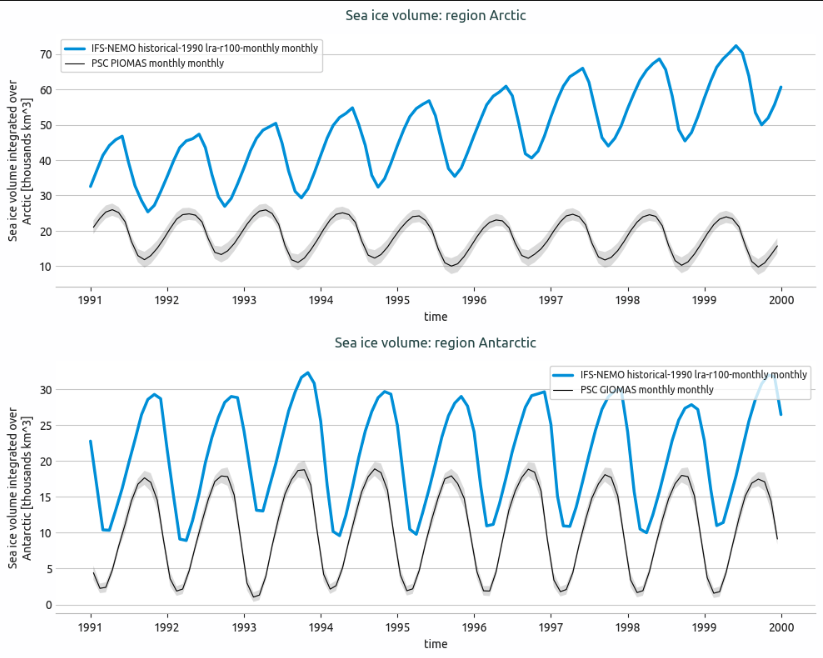
Time series of sea ice volume for Arctic and Antarctic regions.
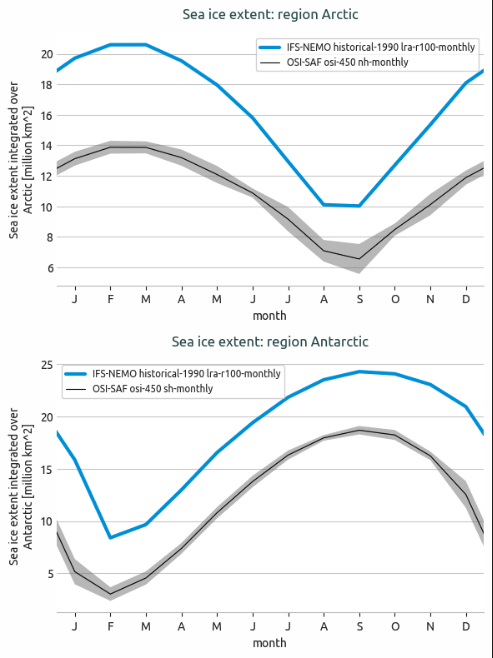
Seasonal cycle of sea ice extent for Arctic and Antarctic regions
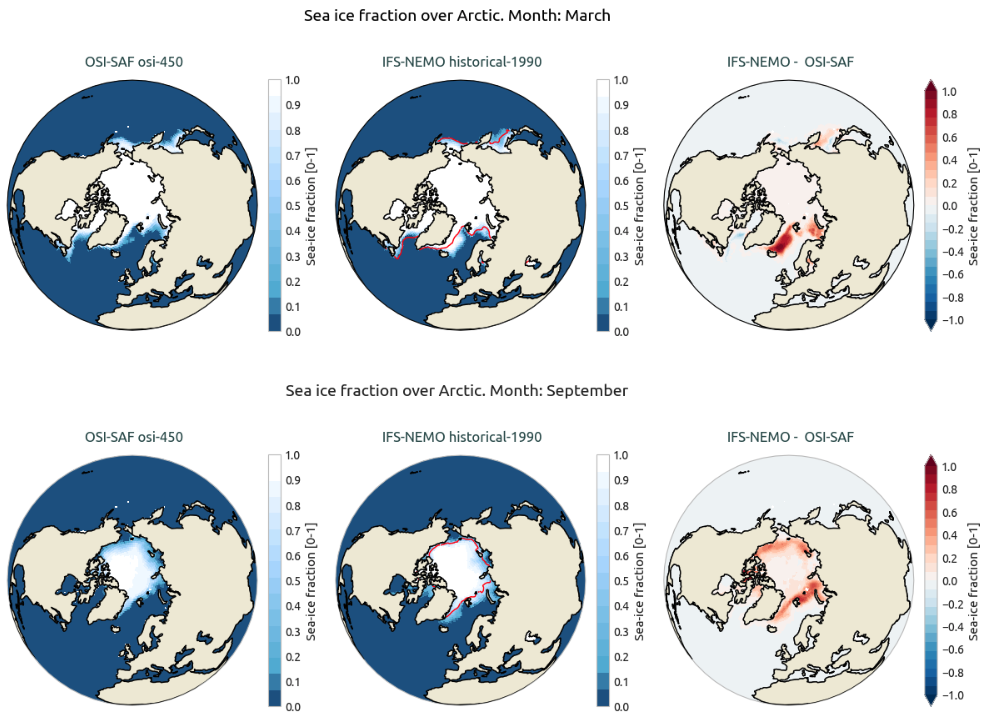
2D sea ice fraction maps for the Arctic region (March and September).
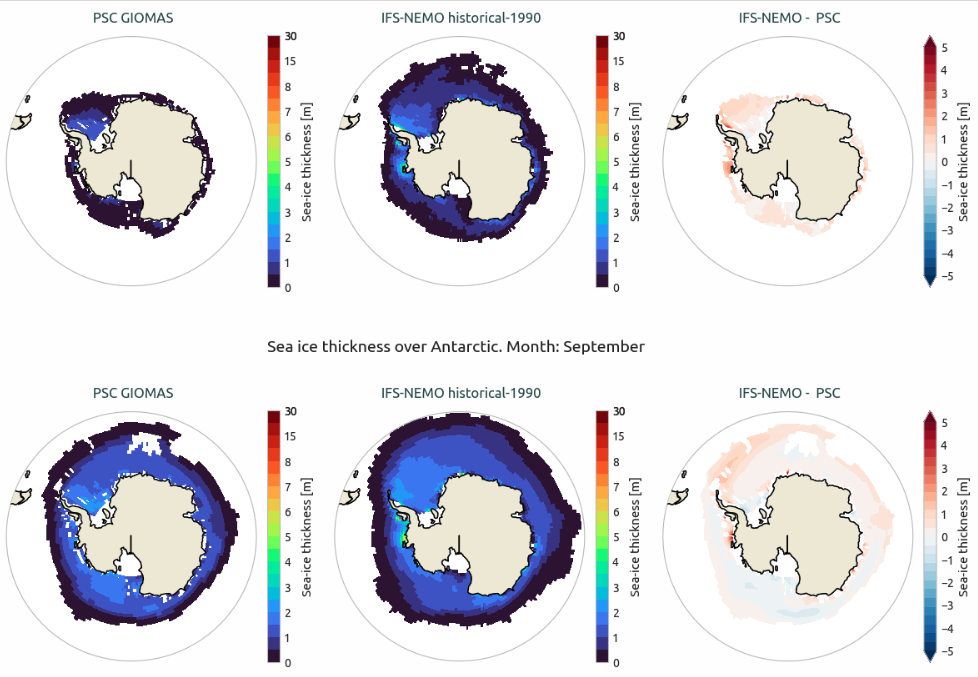
2D sea ice thickness maps for the Antarctic region (March and September).
Available demo notebooks
Notebooks are stored in notebooks/diagnostics/seaice:
References
Lavergne, T., Sørensen, A. M., Kern, S., Tonboe, R., Notz, D., Aaboe, S., Bell, L., Dybkjær, G., Eastwood, S., Gabarro, C., Heygster, G., Killie, M. A., Brandt Kreiner, M., Lavelle, J., Saldo, R., Sandven, S., & Pedersen, L. T. (2019). Version 2 of the EUMETSAT OSI SAF and ESA CCI sea-ice concentration climate data records. The Cryosphere, 13(1), 49-78. https://doi.org/10.5194/tc-13-49-2019.
Knowles, K., E. G. Njoku, R. Armstrong, and M. J. Brodzik. 2000. Nimbus-7 SMMR Pathfinder Daily EASE-Grid Brightness Temperatures, Version 1. Boulder, Colorado USA. NASA National Snow and Ice Data Center Distributed Active Archive Center. https://doi.org/10.5067/36SLCSCZU7N6.
Detailed API
This section provides a detailed reference for the Application Programming Interface (API) of the seaice diagnostic,
produced from the diagnostic function docstrings.
- class aqua.diagnostics.seaice.Plot2DSeaIce(ref=None, models=None, regions_to_plot: list = ['Arctic', 'Antarctic'], outputdir='./', rebuild=True, dpi=300, loglevel='WARNING')
Bases:
objectA class for processing and visualizing surface maps and biases of sea ice fraction or thickness.
- Parameters:
ref (xarray.DataArray or xarray.Dataset) – Reference sea ice data.
models (list of xarray.DataArray or xarray.Dataset) – List of models with sea ice data.
regions_to_plot (list) – List of strings with the region names to plot which must match the ‘AQUA_region’ attribute in the data provided as input.
outputdir (str) – Output directory for saving plots.
rebuild (bool) – Whether to rebuild the plots if they already exist.
dpi (int) – Dots per inch for the saved figures.
loglevel (str) – Logging level for the logger. Default is ‘WARNING’.
- plot_2d_seaice(plot_type='var', months=[3, 9], method='fraction', projkw=None, plot_ref_contour=False, save_format=['png', 'pdf', 'svg'], show=False, **kwargs)
Plot sea ice data and biases.
- Parameters:
plot_type (str) – Type of plot to generate [‘var’ or ‘bias’].
months (list) – List of months to plot, e.g. [2, 9] for February and September.
projkw (dict) – Dictionary with projection parameters for the plot.
save_format (str or list, optional) – Format(s) to save the figure. Default is SAVE_FORMAT.
plot_ref_contour (bool) – Whether to add a reference line at 0.2 for sea ice fraction.
show (bool) – If True, display the plot interactively (e.g., in Jupyter notebooks).
**kwargs – Additional keyword arguments for customization. See below functions for details.
- class aqua.diagnostics.seaice.PlotSeaIce(monthly_models=None, annual_models=None, monthly_ref=None, annual_ref=None, monthly_std_ref: str = None, annual_std_ref: str = None, model: str = None, exp: str = None, source: str = None, catalog: str = None, regions_to_plot: list = ['Arctic', 'Antarctic'], outputdir='./', rebuild=True, filename_keys=None, dpi=300, loglevel='WARNING')
Bases:
objectA class for processing and visualizing timeseries of integrated sea ice extent or volume. It is designed to work with AQUA-computed outputs (from the SeaIce diagnostic) repacking them into a unified format for easy comparison, labeling, and plotting.
- Parameters:
monthly_models (xr.Dataset | list[xr.Dataset] | None, optional) – Monthly model datasets to be processed. Defaults to None.
annual_models (xr.Dataset | list[xr.Dataset] | None, optional) – Annual model datasets to be processed. Defaults to None.
monthly_ref (xr.Dataset | list[xr.Dataset] | None, optional) – Monthly reference datasets for comparison. Defaults to None.
annual_ref (xr.Dataset | list[xr.Dataset] | None, optional) – Annual reference datasets for comparison. Defaults to None.
monthly_std_ref (str, optional) – Monthly standard deviation reference dataset identifier. Defaults to None.
annual_std_ref (str, optional) – Annual standard deviation reference dataset identifier. Defaults to None.
model (str, optional) – Name of the model associated with the dataset. Defaults to None.
exp (str, optional) – Experiment name related to the dataset. Defaults to None.
source (str, optional) – Source of the dataset. Defaults to None.
catalog (str, optional) – Catalog name of the dataset. Defaults to None.
regions_to_plot (list, optional) – List of region names to be plotted (e.g., [‘arctic’, ‘antarctic’]). If None, all available regions are plotted. Defaults to None.
outputdir (str, optional) – Directory to save output plots. Defaults to ‘./’.
rebuild (bool, optional) – Whether to rebuild (overwrite) figure outputs if they already exist. Defaults to True.
exists. ((overwrite) figure outputs if) – List of keys to include in the output filenames. If None, all keys are included. Defaults to None.
dpi (int, optional) – Resolution of saved figures (dots per inch). Defaults to 300.
loglevel (str, optional) – Logging level for debugging and information messages. Defaults to ‘WARNING’.
- plot_seaice(plot_type: str = 'timeseries', save_format: str | list = ['png', 'pdf', 'svg'], style: str = None, **kwargs)
Plot sea ice data for each region, either as timeseries or seasonal cycle.
- Parameters:
plot_type (str, optional) – Type of plot to generate. Options are ‘timeseries’ or ‘seasonalcycle’. Default is ‘timeseries’.
save_format (str or list, optional) – Format(s) to save the figure. Default is SAVE_FORMAT.
style (str, optional) – Override the plotting style. Default to None (which will get the style from config file or fallback to’aqua’).
**kwargs – Additional keyword arguments passed to the region-specific plotting function.
- regions_type_plotter(region_dict, style, **kwargs)
Loops over each region in region_dict and plots data either as a timeseries or a seasonal cycle depending on plot_type attribute.
- Parameters:
region_dict (dict) – Dictionary of regions and their associated data.
style (str) – Graphic style of the plot.
**kwargs (dict) – Additional keyword arguments passed on to the underlying plotting function.
- Returns:
tuple. The figure and axes objects.
- Return type:
(fig, axes)
- repack_datasetlists(**kwargs) dict
Repack input datasets into a nested dictionary organized by method and region.
The output dictionary is structured as:
{ method: { region: { str_data: [list of data arrays] }}}
where:
‘method’ is extracted from the dataset attributes (defaulting to “Unknown”).
‘region’ is determined by self._get_region(dataset, data_var).
‘str_data’ is the keyword with the data in input, and each value is a list of data arrays corresponding to that keyword.
- Parameters:
**kwargs (dict) – Keyword arguments, where each str_data is linked to the kwargs in plot_timeseries() and each value is a list of xr.Dataset objects.
- Returns:
A nested dict containing the repacked data arrays.
- Return type:
dict
- save_fig(fig, save_format: str | list = ['png', 'pdf', 'svg'], metadata: dict = None, region_dict: dict = None)
Save a matplotlib figure in the specified format(s) with associated metadata.
- Parameters:
fig (matplotlib.figure.Figure) – The figure object to be saved.
save_format (str or list, optional) – Format(s) to save the figure. Default is SAVE_FORMAT.
metadata (dict, optional) – Metadata such as description to be saved. Defaults to None.
region_dict (dict, optional) – Dictionary of regions plotted. Used to generate output filename. Defaults to None.
- class aqua.diagnostics.seaice.SeaIce(model: str, exp: str, source: str, catalog=None, regrid=None, startdate=None, enddate=None, std_startdate=None, std_enddate=None, threshold=0.15, regions=['arctic', 'antarctic'], regions_file=None, outputdir: str = './', loglevel: str = 'WARNING')
Bases:
DiagnosticSea ice diagnostic class for computing and analyzing sea ice metrics.
This class provides methods to compute sea ice extent (million km²), volume (thousand km³), fraction (dimensionless, 1) and thickness (m) over specified regions (e.g., Arctic, Antarctic). It supports both time series (integrated), with options for computing standard deviations, seasonal cycles, and 2D monthly climatologies.
- Parameters:
model (str) – The model name.
exp (str) – The experiment name.
source (str) – The data source.
catalog (str, optional) – The catalog name.
regrid (str, optional) – The regrid option.
startdate (str, optional) – The start date for the data (format: “YYYY-MM-DD”).
enddate (str, optional) – The end date for the data (format: “YYYY-MM-DD”).
std_startdate (str, optional) – Start date for standard deviation.
std_enddate (str, optional) – End date for standard deviation.
threshold (float, optional) – Threshold for sea ice concentration over extent (default: 0.15; 15% conc).
regions (list, optional) – A list of regions to analyze. Default: [‘arctic’, ‘antarctic’].
regions_file (str, optional) – Path to YAML file defining regions definition file.
outputdir (str, optional) – The output directory (default: ‘./’).
regions_definition (dict) – The loaded regions definition from the YAML file.
loglevel (str, optional) – The logging level. Defaults to ‘WARNING’.
Initialize the diagnostic class. This is a general purpose class that can be used by the diagnostic classes to retrieve data from a single model and to save the data to a netcdf file. It is not a working diagnostic class by itself.
- Parameters:
model (str) – The model to be used.
exp (str) – The experiment to be used.
source (str) – The source to be used.
catalog (str) – The catalog to be used. If None, the catalog will be determined by the Reader.
regrid (str | None) – The target grid to be used for regridding. If None, no regridding will be done.
startdate (str | None) – The start date of the plot/analysis period. If None, all available data will be used.
enddate (str | None) – The end date of the plot/analysis period. If None, all available data will be used.
std_startdate (str | None) – The start date of the standard deviation period. If None, no std period is tracked at the Diagnostic level.
std_enddate (str | None) – The end date of the standard deviation period. If None, no std period is tracked at the Diagnostic level.
loglevel (str) – The log level to be used. Default is ‘WARNING’.
- MINIMUM_MONTHS_REQUIRED = 1
- add_seaice_attrs(da_seaice_computed: DataArray, region: str, startdate: str = None, enddate: str = None, std_flag=False)
Adds metadata attributes to a computed sea ice DataArray. This function assigns descriptive attributes to an xr.DataArray representing computed sea ice (extent or volume) for a specific region and time period.
- Parameters:
da_seaice_computed (xr.DataArray) – The computed sea ice data to which attributes will be added.
region (str) – The geographical region over which sea ice data is computed.
startdate (str, optional) – The start date of the data (format “%Y-%m”). Default to None.
enddate (str, optional) – The end date of the data (format “%Y-%m”). Default to None.
std_flag (bool, optional) – If True, add the std computation as
AQUA_std_startdateandAQUA_std_enddate. Defaults to False.
- Returns:
xr.DataArray
- compute_seaice(method: str = 'extent', var: str = None, *args, **kwargs)
Execute the seaice diagnostic based on the specified method.
- Parameters:
var (str) – The variable to be used for computation. Default is ‘sithick’ or ‘siconc’.
method (str) – The method to compute sea ice metrics. Options are ‘extent’ or ‘volume’.
- Kwargs:
threshold (float): The threshold value for which sea ice fraction is considered. Default is 0.15.
reader_kwargs (dict, optional): Additional keyword arguments to pass to the Reader.
- Returns:
The computed sea ice metric. A Dataset is returned if multiple regions are requested.
- Return type:
xr.DataArray or xr.Dataset
- get_area_cells_and_coords(masked_data: DataArray)
Get areacello and space coordinates
- Parameters:
masked_data (xr.DataArray) – The masked data to be checked if it is regridded or not
- Returns:
The area grid cells (m^2).
- Return type:
xr.DataArray
- integrate_seaice(masked_data, region: str)
Integrate the masked data over the spatial dimension to compute sea ice metrics. If method is extent / volume, divide by 1e12 to convert to million km^2 / thousand km^3.
- Parameters:
masked_data (xr.DataArray) – The masked data to be integrated.
region (str) – The region for which the sea ice metric is computed.
- Returns:
The computed sea ice metric.
- Return type:
xr.DataArray
- load_regions(regions_file=None, regions=None)
Loads region definitions from the centralized regions YAML and sets the selected regions.
- Parameters:
regions_file (str) – Full path to a custom region file. If None, the centralized file is used.
regions (str or list of str) – A region or list of region names to load. If empty or None, falls back to
["arctic", "antarctic"].
- save_netcdf(seaice_data, diagnostic: str, diagnostic_product: str = None, rebuild: bool = True, output_file: str = None, **kwargs)
Save the computed sea ice data to a NetCDF file.
- Parameters:
seaice_data (xr.DataArray or xr.Dataset) – The computed sea ice metric data.
diagnostic (str) – The diagnostic name. It is expected ‘SeaIce’ for this class.
diagnostic_product (str, optional) – The diagnostic product. Can be used for namig the file more freely.
rebuild (bool, optional) – If True, rebuild (overwrite) the NetCDF file. Default is True.
output_file (str, optional) – The output file name.
**kwargs – Additional keyword arguments for saving the data.
- select_region_area_cell(areacello: DataArray, region: str, drop: bool = True)
Select the area cells for a specific region based on the region definition.
- Parameters:
areacello (xr.DataArray) – The area cells DataArray.
region (str) – The region for which to select the area cells.
- Returns:
The area cells DataArray filtered by the region coordinates.
- Return type:
xr.DataArray